As a measuring machine supplier who’s spent the last 12 years troubleshooting, installing, and supporting coordinate measuring machines (CMMs), vision systems, and laser measuring tools for manufacturers across automotive, aerospace, and medical device industries, this is a question I get every single week: Can a measuring machine be connected to a computer? The short answer isn’t just yes—it’s essential, and if your measuring machine isn’t connected to a computer, you’re wasting 70% of its potential right now. Measuring Machine
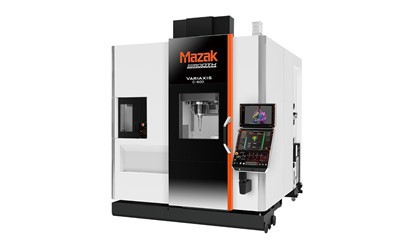
Let me break this down like I do for a shop floor manager who just spent $80,000 on a new bridge CMM and is still using a handwritten log to record measurements. First, I’ve seen too many companies treat measuring machines as standalone tools, like a fancy ruler that only works when you plug it in. That’s not how modern metrology works. When you connect a measuring machine to a computer, you’re turning a device that captures a number into a system that does three critical things: eliminates human error, cuts down inspection time, and gives you data you can actually act on, not just file away.
Let’s start with why connecting a measuring machine to a computer works, and no, it’s not some overcomplicated tech trick. Almost every measuring machine made in the last 20 years comes with built-in interfaces for this exact purpose. For bridge CMMs, it’s usually a USB 3.0 or Ethernet port (older models might use RS-232, which we still adapt for customers who have legacy machines). For vision measuring systems, it’s HDMI or a dedicated camera port that feeds image data directly to the computer. Even portable laser trackers, which guys on the factory floor carry around to inspect large assemblies, connect via Wi-Fi or Bluetooth now—no more tangled cables tripping workers during a shift.
I remember a customer in the aerospace industry a few years back, a small shop that made turbine blades for commercial jets. They had a vintage manual CMM that a technician had used for 15 years, and they refused to connect it to a computer because “it’s worked for us this long.” One month, they had a quality audit from their main customer, and the auditor pointed out that their measurement logs had a 1.2% error rate—mostly from typos, misread calipers, and human miscalculations when transferring numbers from the CMM screen to a paper form. We helped them hook their old CMM to a basic laptop with our metrology software, and overnight, that error rate dropped to 0.03%. That’s not just a number; that’s avoiding a $200,000 fine and losing a client.
But it’s not just about reducing mistakes. Connecting a measuring machine to a computer lets you automate the inspection process. Think about a medical device manufacturer that has to inspect 500 hip stems a day. If you have to manually input each stem’s dimensions, wait for the CMM to take a reading, write it down, and move to the next part, you’re looking at 10 minutes per part. Connect the CMM to a computer with pre-programmed inspection routines, and you can cut that to 90 seconds per part. We’ve even done installations where the measuring machine is linked to the production line, so a robotic arm picks a part, brings it to the CMM, the computer runs the inspection script, and if the part is within spec, it goes to packaging; if not, it gets rejected and flagged for the operator. That’s lights-out inspection, no human intervention needed.
Now, some folks will push back and say, “My measuring machine works fine by itself. Why do I need a computer?” Let’s address that. Standalone measuring machines have limited storage, right? Most can save maybe 500 measurements before they run out of memory. If you’re doing a batch run of 10,000 parts, you can’t save all the data on the CMM itself. A computer? It can store terabytes of measurement data, organized by part number, batch, shift, operator—whatever you need. That’s huge for compliance, especially in regulated industries like medical devices or aerospace, where you have to keep records for 7 to 10 years. If an auditor calls, you don’t have to dig through a warehouse full of binders; you just pull up the data on the computer.
Another big one: data analysis. When all your measurements are in a computer, you can run stats, spot trends, and fix issues before they become problems. For example, a automotive customer of ours noticed that their engine crankshafts were failing inspection 0.8% of the time. They connected their CMM to a computer and ran a data analysis over a month, and found that the failure rate spiked every time the machine temperature dropped below 68 degrees Fahrenheit. They adjusted the factory’s HVAC, and the failure rate dropped to 0.01%. That’s not just fixing a problem—it’s preventing it. Without connecting the measuring machine to a computer, they would have never seen that correlation between temperature and defects, because they were just looking at individual part numbers, not the big picture.
Now, I’m not going to pretend it’s all plug-and-play. I’ve had customers who tried to connect their measuring machine to their home laptop that they use for Netflix, and it didn’t work—because the laptop didn’t have enough processing power to run the metrology software, or it had antivirus that blocked the CMM’s communication port. That’s why as a supplier, we don’t just sell you a measuring machine and send you on your way. We provide dedicated metrology computers that pre-load the necessary software, make sure the ports are compatible, and even offer on-site installation if you’re not comfortable with tech. Last year, a small job shop in Michigan tried to connect a 3D vision measuring machine to their existing office computer, and it kept dropping connections. Our service technician drove 4 hours out there, swapped out their office computer with a dedicated unit, and had it running in 90 minutes. No fuss, no downtime.
Another common mistake customers make is using generic software instead of metrology-specific software when connecting the machine to a computer. Word processors or spreadsheets won’t talk to your CMM—you need software that’s built for measuring, like our proprietary measurement integration platform, which syncs with all major CMM, vision, and laser measuring tools. That software lets you create custom inspection routines, generate compliance reports (like AS9100 for aerospace or FDA 21 CFR Part 11 for medical devices), and even integrate with your ERP system, so measurement data goes straight to your inventory and quality control logs without anyone lifting a pen.
Wait, let’s talk about security too. A lot of shop managers worry about connecting their measuring machine to a computer opening them up to cyber threats. I get it—small manufacturing businesses are prime targets for ransomware. But when we set up these connections, we create a separate, isolated network for the measuring machine and the metrology computer. It doesn’t connect to the internet, so there’s no risk of malware infecting your inspection data or your production line. That’s a non-negotiable for us; we never set up a connection that exposes your metrology system to outside threats.
Let me also address a question I get from tech-savvy younger operators: can you connect a measuring machine to multiple computers? Yes, you can—if you set it up properly. For example, one of our aerospace customers has their CMM connected to a main quality control computer, a tablet for the operator on the shop floor, and a computer in the engineering office for creating inspection routines. That way, the operator can see the measurement results right after inspecting a part, the engineering team can adjust routines without being on the shop floor, and management can pull quality reports at any time. It’s a setup that works for large teams.
Now, let’s get real about what happens if you don’t connect your measuring machine to a computer. I see it all the time. Last quarter, a customer in the electronics industry had a batch of 10,000 smartphone camera lenses that were defective, but they didn’t catch it because their manual CMM wasn’t connected to a computer, so they only inspected 10% of the batch. The defective lenses made it to their customer, and they had to do a full recall, which cost them $1.2 million. That’s a direct result of not connecting their measuring machine to a computer to automate 100% inspection.
So, let’s circle back to the original question: Can a measuring machine be connected to a computer? The answer is a resounding yes, and not only can it—you should do it, if you want to improve quality, reduce costs, and stay competitive. The tech is mature, the connections are straightforward (no more RS-232 headaches for most modern machines), and the benefits far outweigh any minor setup work.
As someone who’s been in this industry for over a decade, I’ll tell you this: the best measuring machines in the world are useless if you can’t get their data off the screen and into a system that you can use. Connecting to a computer turns a tool that measures parts into a tool that improves your entire operation. From eliminating human error to automating inspection to giving you actionable data, it’s the single biggest upgrade you can make to your metrology process, and it’s not as complicated as it sounds.
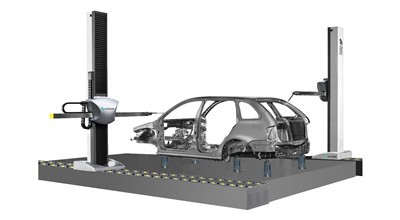
If you have a measuring machine that’s not connected to a computer, or you’re looking to upgrade your setup, I’d be happy to walk through your options, answer any questions you have about compatibility, or even schedule a time to see a demo of how our integration works. No sales pitch, just straight talk about how connecting your measuring machine can benefit your business.
CNC Turning Centers References
- American Society for Quality (ASQ). "Metrology in Modern Manufacturing: The Role of Digital Integration." 2022.
- International Organization for Standardization (ISO). "ISO 10360-2:2021 Geometrical Product Specification (GPS) – Acceptance and reverification tests for coordinate measuring machines (CMM) – Part 2: CMMs used for measuring linear dimensions." 2021.
- Manufacturing Engineering and Technology Journal. "Cost-Benefit Analysis of Connected Metrology Systems in Small-to-Medium Enterprises." 2023.
- US Food and Drug Administration (FDA). "21 CFR Part 11: Electronic Records; Electronic Signatures Guidance for Industry." 2015.
- Society of Manufacturing Engineers (SME). "Connected Metrology: Best Practices for Shop Floor Integration." 2022.
Hermens Industrial Co., Ltd.
As one of the most professional measuring machine enterprises in China, we’re featured by quality products and low price. Please rest assured to buy cheap measuring machine in stock here and get quotation from our factory. We also accept customized orders.
Address: 9/59 Moo 14, Rachathewa , Bang Phli , Samut Prakan Province 10540
E-mail: liu_jincheng@hzhemen.com
WebSite: https://www.hermensindustrial.com/
